Breeder software
Free breeder software with pedigrees, a waitlist, a storefront and signed sale paperwork
Dog and cat breeders use Petlovin' as free breeder software: one record per animal with photos, parents and a family tree, a care calendar for vaccinations and deworming, a waitlist by breed that is emailed when a match is published, a hosted storefront or a line on your own website, and a register that produces the bill of sale and health guarantee for signature. There is no limit on animals and no monthly fee. It does not plan heat cycles or matings.
How it works
- 1
Records that start from the papers
Snap the registration and the vaccine card; the AI pre-fills the record. Add the sire and dam once and the family tree appears on every puppy's page.
- 2
A waitlist by breed
Families who asked about the breed are on a list with consent. When you publish a puppy of that breed, they are emailed.
- 3
A storefront you do not have to build
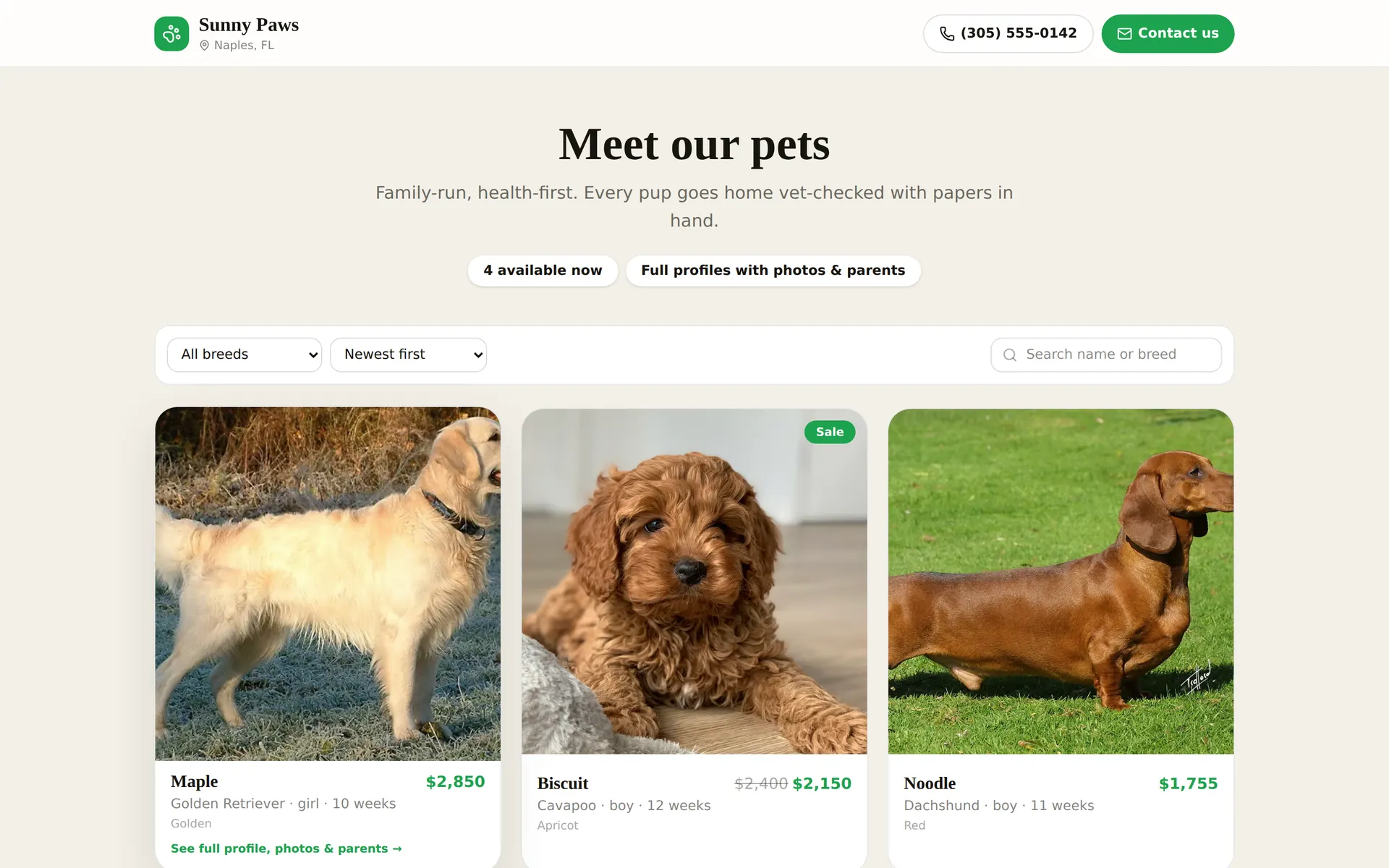
Every breeder gets a public page at petlovin.co in a breeder layout: answer a few questions about your program and it reads like you wrote it, with available puppies, parents and photos. Or a single line of code puts the same thing on your own site.
- 4
A sale with the paperwork done
Deposit with a signed hold agreement, then the bill of sale and health guarantee signed on screen at pickup, sealed and emailed.
What breeders use
KMS
One record per animal
Photos, price, microchip, registration, kennel card and paperwork together on one record.
KMS
AI reads the paperwork
Snap a registration, a pedigree or a handwritten vaccine card and the AI pre-fills the record for you to check.
KMS
Care calendar
Vaccinations, deworming and exams on one schedule, sorted overdue, today, done.
KMS
Pedigrees and parents
Parent photos, lineage and a family tree on every profile, printed and public.
KMS
Photos and video
Drag in photos and video. They are resized and load fast on every device.
KMS
Health records and custom fields
Vet visits, weights, notes and any field your store needs, per animal.
KMS
Print
Kennel cards, QR labels, posters, data sheets and catalogues from the record.
KMS
Import
CSV import from a spreadsheet, and an AI quick-add that pre-fills a pet from a sentence.
KMS
Team access
Per-person logins, job presets, and one login across every store you belong to.
KMS
Automatic markdowns
Rules like 10% off after 60 days in the store. Prices drop on their own, show as a markdown on the storefront, and come back off when you change your mind.
KMS
A first-week checklist
A new store's first steps on the dashboard, each one ticking itself off the moment it happens.
Storefront
A storefront we host
Every store gets a public storefront at petlovin.co, with filters like new arrivals, markdowns and ready to go home.
Storefront
Two looks: pet store or breeder program
A shop layout for a store with many animals, or a breeder layout that tells your story from a few questions: who you are, how the puppies are raised, what they go home with.
Storefront
Your prices, your rules
Show prices, hide them all, hide them per pet, or only show them under an amount you set. A hidden price stays hidden everywhere: share links, catalogues, your website, printouts and the chat assistant.
Storefront
Or one line on your site
Paste one script tag and your available pets appear on your own website, prices and all.
Storefront
Catalogues and shareable profiles
Group pets and products into catalogues, public or private link only, and share any pet's profile. A private catalogue can open each pet's passport, vet records and pedigree to the buyer.
POS
A register for pets and products
Sell a puppy and a bag of food on one ticket. A pet is one of one, so it is held the moment it lands in a cart.
POS
Deposits and holds
Take a hold deposit with a signed agreement, apply it to the final sale, or refund it.
POS
Every kind of payment
Record cash, check, card, financing, deposit, gift card and store credit on one ticket, with change and balance worked out.
POS
Paperwork at checkout
Bill of sale, health guarantee and records come out of the record, signed on the counter screen or on the buyer's own phone, sealed as PDFs with a verification page.
POS
Any agreement, e-signed
Start from a ready template or upload your own PDF, place the fields where they go, and send it for signature. Co-ownership, guardian homes, stud service, anything.
POS
Welcome home package
When a pet goes home, the family gets one page with what is left to do, counted: sign the paperwork, get an insurance quote, check their Come Home details, add their vet, register the chip. It goes out on its own when the sale closes, and you see the same "3 of 6" on the sale and in the CRM.
POS
Insurance at handoff
Stores enrolled in the Kanguro program offer the buyer a pet insurance quote at the counter.
POS
Come Home lost-pet recovery
Every pet sold gets lifetime lost-pet recovery at no charge: a coded tag scanned onto the pet at the counter, a tag page that reaches the family in one tap, the microchip number on file with the chip maker's registry one click away, lost alerts, a poster and share kit, and a yearly details check.
POS
Products and stock
Food, crates and supplies with barcodes, stock counts, low-stock warnings and write-offs. Scan an item and it is on the ticket.
POS
Returns, voids and approvals
Returns linked to the original sale, stock back on the shelf, manager PIN approvals for voids, discounts and refunds.
POS
Shifts, drawers and reports
Open and close drawers, Z-reports, day totals, tender mix and per-person sales.
POS
Commissions
Commission plans per sale, splits between people, an order-by-order ledger and payouts.
POS
Orders and invoices
Write a catalogue up as an order for one customer or partner store. They open a link with every animal's profile and confirm; each payment you record is a receipt against a numbered invoice, and completing the order marks the pets sold.
Questions, answered
Is there a limit on dogs?
+
No. Petlovin' has no limit on animals or team members.
Free, no card
Get Petlovin' free
$0 per month, no tiers, no trial, no card. Watch the two-minute demo first if you like.
Watch the demo